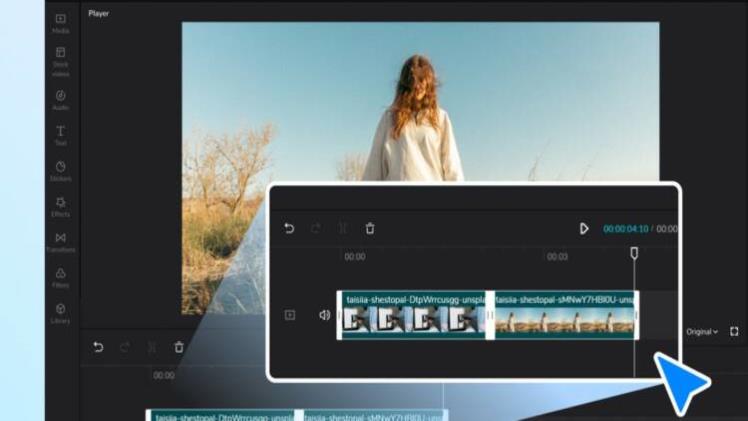
As the digital age progresses, video content continues to surge in popularity, dominating the world of online communication and entertainment. We now capture, consume, and share videos more than ever, with countless platforms facilitating this unprecedented growth. Whether you’re an aspiring YouTuber, a small business owner, a professional video editor, or just someone who loves sharing clips of their life, the ability to trim videos is an essential skill. While professional video editing software can be complex and expensive, the beauty of online video cutters is in their accessibility and simplicity. This article introduces you to the world of online video cutters, showcasing their convenience and guiding you on how to use them to trim your videos seamlessly.
The Rise of Video Content
Before we delve into the specifics of online video cutters, let’s take a moment to appreciate the significance of video content in today’s digital era.
A Picture is Worth a Thousand Words, A Video – A Million
Since the first moving pictures were invented, humanity has been fascinated by the power of video. It captures our attention and stirs our emotions, making it a highly effective means of communication. In today’s digital age, this has only been amplified by the evolution of technology and the rise of social media platforms. Video content is no longer exclusive to big production companies; it has become democratized and accessible to all, and thus its consumption has exploded.
Importance in Marketing and Education
Video content plays a vital role in marketing and education. For businesses, video offers an engaging medium to showcase products or services, explain complex concepts, and connect with customers personally. For educators, video has become an indispensable tool in online learning, allowing them to demonstrate procedures, illustrate concepts, and interact with students virtually.
The Need for Video Editing
With the rising importance of video content, the need for video editing has followed suit. This includes a variety of tasks, from adding effects and soundtracks to adjusting colour balance and, most importantly, trimming.
The Power of Trimming
Video trimming is the process of cutting out unwanted portions of a video. Whether removing bloopers, shortening a lengthy video, or extracting a key segment, trimming is essential for creating a polished, concise, and engaging video. Trimming videos allows you to refine your message, keep your audience’s attention, and ensure your content is as impactful as possible.
Online Video Cutters – Your Convenient Tool
In light of the significance of video trimming, online video cutters have emerged as an accessible, user-friendly solution. These tools offer a simplified video editing experience, removing the need for professional software and expertise.
No Need for Professional Software
Professional video editings software such as Adobe Premiere Pro or Final Cut Pro is powerful and versatile but often complex and expensive. Online video cutters are a perfect alternative for many users, especially those who only need basic editing features. They are typically free or inexpensive and do not require any download or installation. Plus, they are designed with ease of use in mind, featuring intuitive interfaces that even beginners can quickly get the hang of.
Versatility and Accessibility
Most online video cutters support various video formats, so you don’t have to worry about compatibility issues. They are accessible from any device with an internet connection, making it possible to edit your videos anywhere. Some even offer additional editing features such as cropping, rotating, and adding filters or captions, allowing you to refine your videos further.
Trimming Videos with Online Video Cutters – A
Step-by-Step Guide
Now that we’ve established the convenience and potential of online video cutters let’s delve into the process of using them to trim your videos.
Choose the Right Online Video Cutter
First, choose an online video cutter that suits your needs. Many options are available, each with its own features and user interface. Some popular choices include Clideo, Online Video Cutter, and Kapwing. Consider factors such as ease of use, video format compatibility, and additional features when choosing.
Upload Your Video
Once you’ve chosen an online video cutter, the first step is to upload your video. This is usually done by clicking an “Upload” button and selecting the video file from your device. Some platforms also support uploading from online sources such as Google Drive or by pasting a URL.
Trim Your Video
After uploading, your video will be displayed in the video cutter’s interface. You can trim your video by moving sliders along the video’s timeline to set the start and end points of the segment you want to keep. Some tools also allow you to enter specific timecodes for more precise trimming. Consider using an MP4 editor for more extensive editing choices, which provide a greater range of functions to enhance your video content.
Review and Export
Review it once you’ve trimmed your video to ensure it’s exactly as you want. Many online video cutters provide a “Preview” feature for this purpose. If you’re satisfied with your trimmed video, export it. The tool will process your video and give you a download link once it’s ready. Depending on the video’s length and the tool’s processing speed, this can take a few seconds to several minutes.
Maximizing the Potential of Online Video Cutters
As you can see, trimming videos with online video cutters is a straightforward process. However, you can follow a few tips to maximise these tools’ potential.
Take Advantage of Additional Features
While the primary function of online video cutters is to trim videos, many offer additional editing features. These include adding filters, adjusting brightness or contrast, rotating or flipping the video, and adding text or captions. Take the time to explore these features; they can significantly enhance your videos.
Use Keyboard Shortcuts
Many online video cutters support keyboard shortcuts, speeding up your editing process. Common shortcuts include using the arrow keys to move the playhead frame by frame or using the space bar to play and pause the video.
Save Regularly
Though online video cutters operate in your web browser, most do not auto-save your work. Therefore, saving regularly is crucial, especially if you’re working on a lengthy video or making numerous edits. This will prevent any loss of progress due to unforeseen issues such as browser crashes or internet disconnections.
Conclusion: Seamlessly Trim Videos with Ease
Online video cutters have democratized video editing, providing a user-friendly, accessible tool for anyone to trim their videos. Whether you’re a content creator looking to engage your audience, a business aiming to showcase your products, or just someone sharing videos of your life, online video cutters offer a simple and effective solution.
With this comprehensive guide, you’re now well-equipped to navigate the world of online video cutters and trim your videos seamlessly. So go ahead and start editing – your video content will only get better from here.